SEO / Technical Guide 2026
The Complete SEO Audit Checklist for Beginners
Everything to check across technical SEO, on-page content, and links — organized so you actually know where to start.
Updated: 2026
·
Reading time: ~12 min
An SEO audit sounds intimidating until you realize it’s really just a structured way of asking “is anything obviously broken?” across a handful of categories. This SEO audit checklist for beginners walks through exactly what to check, in what order, without assuming you already know what half the terms mean — because the first audit is usually where most of the easy wins are sitting, untouched.
A first SEO audit usually turns up more low-hanging fruit than expected
SEO Audit Checklist for Beginners: Where to Start
An SEO audit is a review of your website across the factors that affect how easily search engines can crawl, understand, and rank it — and how easily real visitors can use it once they arrive. It’s not a single tool or a single report; it’s a process that pulls together technical checks, content review, and link analysis into one pass.
For beginners, the goal of a first audit isn’t perfection — it’s finding the handful of issues quietly holding a site back: pages blocked from crawling by accident, missing meta tags, broken links, or images with no alt text. Fixing five real issues does more than chasing an SEO “score” to 100.
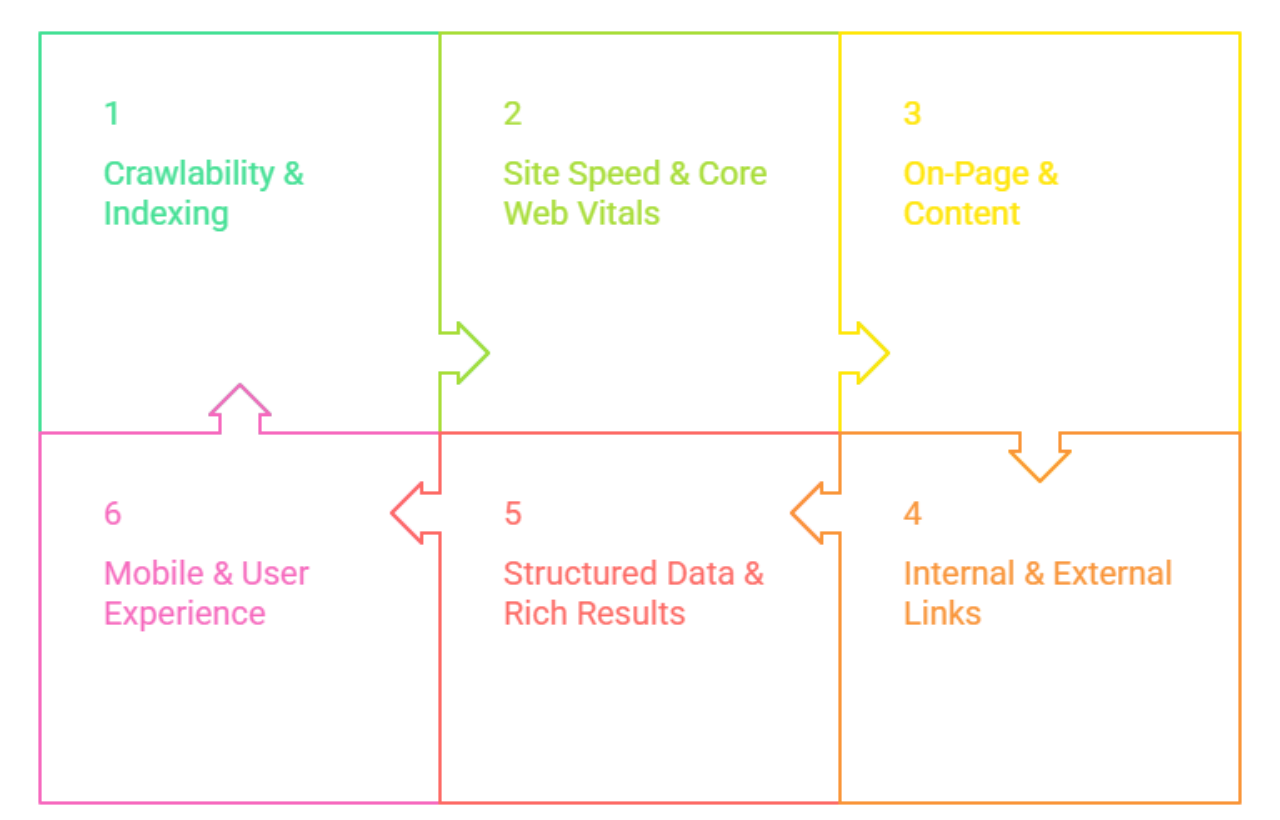
1 Crawlability & Indexing
Before anything else, confirm search engines can actually access your site the way you intend.
✓
Robots.txt file exists and isn’t accidentally blocking important pages — check with a
robots.txt generator
✓
No important pages are accidentally set to “noindex”
✓
Search Console shows no major coverage or indexing errors
2 Site Speed & Core Web Vitals
A slow site quietly costs both rankings and conversions — this is worth checking early, since fixes here can take longer to implement.
✓
Core Web Vitals scores checked on both mobile and desktop
✓
No render-blocking scripts loading unnecessarily on first paint
✓
Mobile page load time tested separately from desktop, since they often differ significantly
3 On-Page & Content
This is where most beginner audits find the most fixable issues — small, page-level details that are easy to overlook once a site grows past a handful of pages.
✓
Every page has a unique title tag under 60 characters
✓
Each page has exactly one H1, and headings follow a logical H2/H3 hierarchy
✓
Thin or duplicate content pages identified and either expanded, merged, or removed
4 Internal & External Links
Links quietly hold your site together — broken ones waste crawl budget and frustrate visitors, while smart internal linking helps both.
✓
Important pages have enough internal links pointing to them — no orphaned pages with zero internal links
✓
Outbound links point to relevant, credible sources and open correctly
✓
Anchor text is descriptive and varied, not repeating the exact same phrase everywhere
5 Structured Data & Rich Results
Schema markup doesn’t guarantee a rich result, but skipping it removes the possibility entirely.
✓
Structured data validated for errors before publishing
✓
Multilingual or multi-regional sites have correctly implemented hreflang tags, checked with a
hreflang tag checker
6 Mobile & User Experience
With most search traffic coming from mobile devices, this category is no longer optional or secondary.
✓
Site displays correctly and is fully usable on a real mobile device, not just a resized browser window
✓
Tap targets (buttons, links) are large enough to use comfortably on a touchscreen
✓
Pop-ups and interstitials don’t block content immediately on mobile
✓
Site uses HTTPS across every page, with no mixed-content warnings
Start Your Link Audit Free →
How Often Should Beginners Run an Audit?
A full audit doesn’t need to happen every month, but a few checks are worth turning into habits rather than one-off events.
Weekly
Glance at Search Console for new indexing errors or sudden traffic drops
Monthly
Run a broken link check and review new pages for missing meta tags or alt text
Quarterly
Full audit across all six categories above, especially after any site redesign
After major changes
Re-run crawlability and speed checks immediately after migrations, redesigns, or CMS updates
Where Beginners Usually Start
If this is genuinely your first audit, start with Crawlability & Indexing, then On-Page & Content — those two categories alone usually surface the issues with the biggest impact for the least effort.
Advanced SEO Checklist (Once the Basics Are Covered)
Once the six categories above are in good shape, these checks go a level deeper — more relevant for larger sites, competitive niches, or anyone auditing a site for the second or third time rather than the first.
7 Crawl Budget & Log File Analysis
✓
Server log files reviewed to see which pages search engine bots actually crawl, not just which pages are linked
✓
Low-value pages (filtered/faceted URLs, internal search results) checked for unnecessary crawl budget consumption
✓
Redirect chains identified and shortened to a single hop rather than multiple redirects stacked together
✓
Orphaned pages found through log files that don’t appear in any internal link or sitemap
8 JavaScript SEO
✓
Critical content confirmed visible in Google’s rendered HTML, not just in the initial page source
✓
Client-side rendered pages tested with the URL Inspection tool in Search Console to confirm they render and index correctly
✓
Lazy-loaded content confirmed accessible to crawlers, not hidden behind interactions bots won’t trigger
9 Field Data & Real-World Performance
✓
Core Web Vitals reviewed using real-user field data (CrUX report), not just lab data from a single test run
✓
Performance compared across key page templates separately — homepage, product pages, blog posts often differ significantly
✓
Third-party scripts (ads, chat widgets, trackers) audited for their individual impact on load time
10 Content Decay & Pruning
✓
Older pages reviewed for declining traffic or rankings over the past 6–12 months in Search Console
✓
Outdated content updated with current information, or consolidated into a stronger, more comprehensive page
✓
Genuinely low-value, thin pages with no organic traffic or backlinks considered for removal or a 301 redirect
11 Backlink Profile Review
✓
Backlink profile reviewed for sudden spikes or patterns that look unnatural or purchased
✓
Toxic or spammy backlinks identified and, where necessary, disavowed
✓
Anchor text distribution checked for over-reliance on exact-match keyword anchors
12 E-E-A-T & Trust Signals
✓
Author bylines and credentials present on content where expertise genuinely matters (health, finance, legal topics)
✓
About, contact, and policy pages exist and are easy to find, supporting overall site trustworthiness
✓
Original data, examples, or first-hand experience present in content — not just a rewrite of what’s already ranking
Advanced Doesn’t Mean Urgent
These checks matter more as a site scales, but they’re not where a first audit should spend its time. Work through the beginner checklist above until it’s clean, then come back to this section on a quarterly or biannual basis.
Frequently Asked Questions
How long does a beginner SEO audit take?
For a small site with under 50 pages, a first full audit using the checklist above typically takes 3–6 hours spread across a few sessions. Larger sites take longer, mainly due to the volume of pages to review individually.
Do I need paid tools to run an SEO audit?
No. Google Search Console, combined with free tools for meta tags, keyword density, broken links, and schema markup, covers everything a beginner audit needs. Paid tools become more useful for large-scale, ongoing monitoring rather than a first audit.
What should I fix first after an audit?
Prioritize crawlability issues first — a page search engines can’t access won’t rank no matter how well it’s written. After that, fix missing or duplicate meta tags and broken links, since these are quick fixes with outsized impact.
Is a perfect SEO audit score necessary?
No. Many automated SEO scoring tools flag minor, low-impact issues alongside genuinely important ones. Focus on the categories in this checklist rather than chasing a specific score number.
Can I audit a WordPress site the same way?
Yes, the same categories apply. WordPress sites often have SEO plugins that handle some of this automatically, but it’s still worth manually verifying sitemap submission, canonical tags, and alt text, since plugin defaults aren’t always configured correctly out of the box.
Final Thoughts
An SEO audit doesn’t need to be complicated to be useful. Work through crawlability, speed, on-page content, links, structured data, and mobile experience in that order, fix what’s genuinely broken, and turn the quick checks into a recurring habit rather than a one-time project. Most first audits uncover more easy wins than expected — the checklist above is exactly where to look for them.
Run Your First Content Check →