How to Find and Fix Broken Links
Dead links quietly waste crawl budget and frustrate visitors — here’s how to find every one on your site and fix them properly, not just patch them.
A broken link is a small thing that never announces itself. Nobody gets an alert when a link starts pointing nowhere — a visitor just clicks it, hits a dead page, and leaves. Multiply that across a site with a few years of published content, old product pages, and the occasional external site that’s gone offline, and most established websites are quietly carrying dozens of broken links they’ve never noticed. Learning how to find and fix broken links is a genuinely quick technical SEO win, once you know where to actually look.
To find and fix broken links: run a full-site scan with a broken link checker, cross-check Google Search Console’s coverage report, prioritize high-traffic pages first, and fix each one with a 301 redirect wherever a relevant destination exists. Repeat the scan monthly or quarterly, since new broken links appear continuously.
Why Broken Links Actually Hurt a Site
Broken links cause damage on three separate fronts, which is part of why they’re worth fixing even when each individual link seems minor. According to Google’s own documentation on how Googlebot crawls sites, crawl budget is a real, finite resource — every dead URL a crawler follows is time and resources not spent on pages that could actually be indexed or updated.
For visitors, a dead link breaks trust in the moment it happens — someone clicked expecting one thing and got a 404 page instead. That’s a small but real hit to how reliable your site feels, especially if it happens more than once in a single session.
For search engines, broken links waste crawl budget. Every dead URL a crawler follows is a request spent on a page that returns nothing useful, instead of being spent discovering or re-crawling pages that actually matter. On larger sites, enough broken links can measurably slow down how quickly new or updated content gets indexed.
For internal link equity, a broken internal link is a dead end in your site’s structure — any authority that would have flowed through it simply stops there instead of reaching the page it was meant to support.
The Different Types of Broken Links
Not every broken link is the same problem, and the fix depends on which type you’re dealing with.
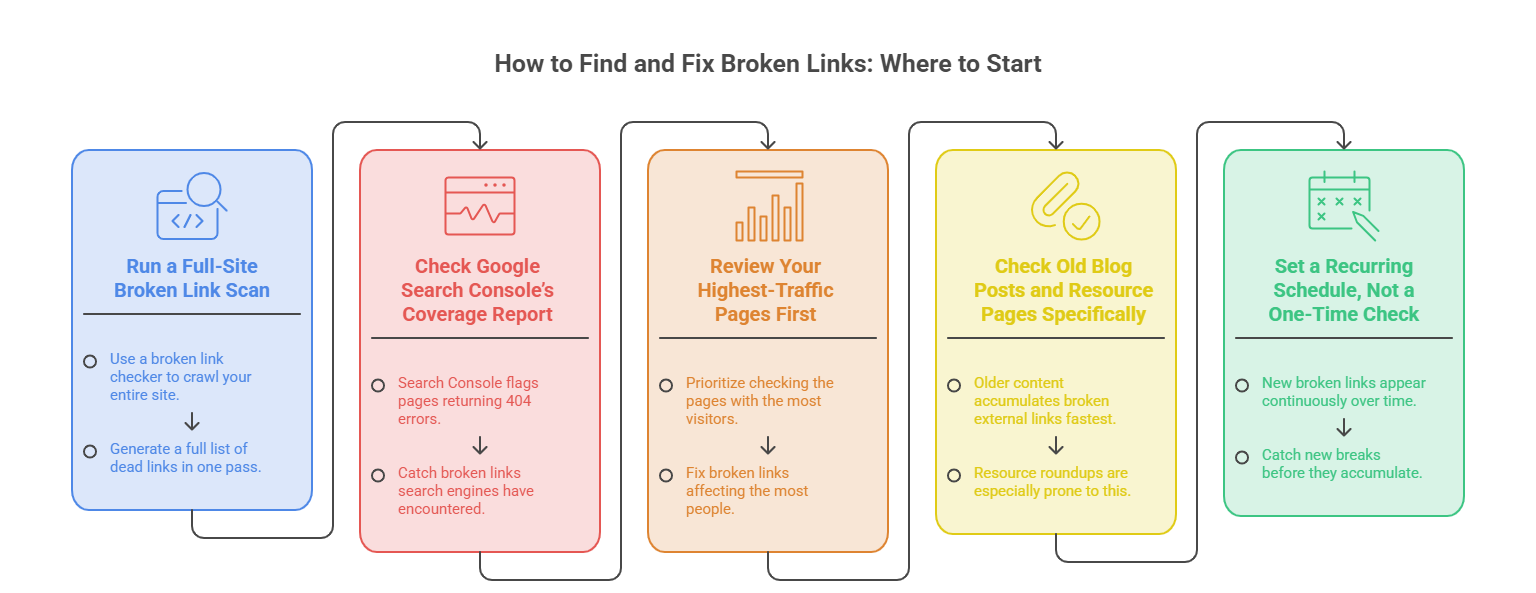
How to Find and Fix Broken Links: Where to Start
Run a Full-Site Broken Link Scan
Use a broken link checker to crawl your entire site and generate a full list of dead links in one pass, rather than checking pages individually by hand.
Check Google Search Console’s Coverage Report
Search Console flags pages returning 404 errors that Google has actually tried to crawl — useful for catching broken links search engines have encountered even if your own crawl missed them.
Review Your Highest-Traffic Pages First
If a full-site scan turns up a long list, prioritize checking the pages with the most visitors — a broken link on a high-traffic page affects far more people than one buried on a page nobody visits.
Check Old Blog Posts and Resource Pages Specifically
Older content that links out to other sites accumulates broken external links fastest, since those sites change independently of anything you control. Resource roundups and “best tools” style posts are especially prone to this.
Set a Recurring Schedule, Not a One-Time Check
New broken links appear continuously as external sites change and internal content gets restructured. A monthly or quarterly scan catches new breaks before they accumulate into a much larger backlog.
Scan Your Site for Broken Links →
How to Fix Each Type of Broken Link
A 301 redirect is almost always the better fix over simply deleting a broken link, since it preserves whatever value — traffic, backlinks, link equity — the original URL had accumulated. Deleting a link is really a last resort for cases where no reasonable destination exists.
301 vs 302: Which Redirect to Use
Not all redirects behave the same way, and picking the wrong type can undermine the fix.
For fixing broken links specifically, a 301 is almost always the right choice. A 302 used for a permanent change can leave the old, broken URL lingering in search results longer than necessary, since search engines treat it as a temporary detour rather than a genuine move.
Broken Links Are One Piece of a Larger Audit
Fixing broken links is one of several checks worth running together — see SEO Audit Checklist for Beginners for the full set of technical and on-page checks that pair well with a broken link scan.
Which Broken Links to Fix First
A site with dozens or hundreds of broken links doesn’t need every single one fixed today. Prioritize in this order:
Common Mistakes When You Find and Fix Broken Links
Frequently Asked Questions
Do broken links actually affect SEO rankings, and how important is it to find and fix broken links?
Should I redirect or just delete a broken link?
How often should I check my site for broken links?
What’s a redirect chain and why does it matter?
Are broken external links as important to fix as internal ones?
Final Thoughts
Learning to find and fix broken links is one of the easiest technical SEO issues to handle, precisely because the fix is almost always simple once the link is actually located. Run a full-site scan, prioritize high-traffic pages first, redirect rather than delete wherever a relevant destination exists, and build the check into a recurring routine instead of a one-time cleanup.
A little consistency here prevents what’s a quick fix today from quietly becoming a much larger backlog later — the kind of technical debt that’s easy to postpone precisely because no single broken link feels urgent on its own.