How to Create a Google Disavow File
A last-resort tool, not a routine one — here’s exactly when it’s needed, and the correct file format to actually use it right.
Most site owners will never need a disavow file, and that’s genuinely good news — it means Google’s own systems are already discounting most spammy links automatically. But when a toxic backlink pattern is serious enough, or a manual action ties directly back to unnatural links, knowing how to create a Google disavow file is the one remaining lever to tell Google directly: don’t count these links toward my site at all.
What a Disavow File Actually Does
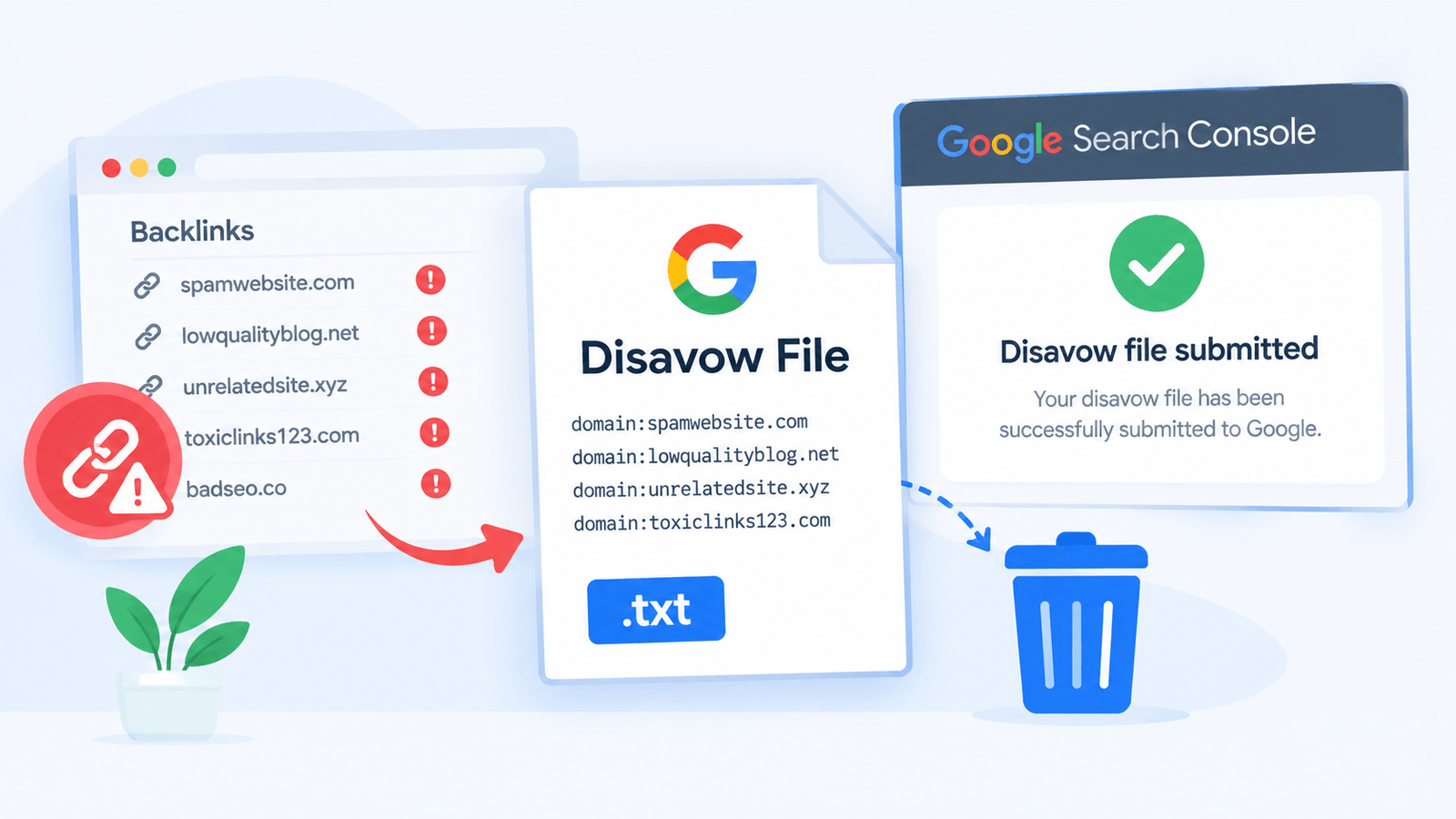
A disavow file is a plain text list of URLs or entire domains you’re asking Google not to take into account when assessing your site’s links. It doesn’t remove the links themselves — they still exist on the web — it just tells Google’s algorithms to treat them as if they weren’t there for ranking purposes.
According to Google Search Central’s official documentation on the disavow tool, this feature is intended for advanced users dealing with a manual action or a genuinely toxic link situation — Google explicitly notes that most sites don’t need to use it at all, since their systems are generally good at ignoring low-quality links on their own.
When You Actually Need One
This is a powerful, risky tool. Disavowing links you didn’t need to disavow can strip away genuine link equity your site was actually benefiting from. Google itself recommends trying to get spammy links removed directly first, and treating disavow as the fallback option.
Identifying Which Links to Disavow
Export Your Full Backlink Profile
Pull a complete list of linking domains from Search Console’s Links report or a third-party backlink tool for a comprehensive starting point.
Flag Clear Spam Signals
Look for link farms, obviously auto-generated spam sites, foreign-language sites with no topical relevance, or domains with an unnaturally large number of outbound links per page.
Try Removal Before Disavowing
Contact site owners requesting removal where realistically possible — this is Google’s stated preferred first step, and disavow should follow only when removal isn’t achievable.
Decide URL-Level vs Domain-Level
Disavow individual URLs when only specific pages on an otherwise legitimate site are problematic; disavow the entire domain when the whole site is clearly spammy.
How to Create a Google Disavow File: The Correct File Format
The disavow file must be a plain .txt file, encoded in UTF-8 or 7-bit ASCII, with one entry per line.
# Disavowing individual URLs
https://spammy-site.com/bad-link-page

# Disavowing an entire domain
domain:spammy-directory.net

# Comments start with a hash symbol
# and are ignored when processed
Use domain: followed by the root domain (no https:// or www.) to disavow every page on that domain at once — this is the more common approach for genuinely spammy sites, since individual URL-level disavows are easy to miss if the spam site adds new pages later.
Rather than building this file by hand and risking a formatting mistake, a disavow file generator formats the list correctly from your input, reducing the risk of a syntax error causing the whole file to be misread.
Build a Properly Formatted File →
Submitting the File to Google
Once the file is ready, upload it through the Disavow Links tool in Google Search Console, selecting the correct property first — the disavow file applies specifically to the property it’s uploaded under. Uploading a new file completely replaces any previous disavow file for that property, so always include every link you want disavowed in the new upload, not just additions.
Processing isn’t instant. Google notes it can take weeks for disavowed links to be fully reflected in how a site is evaluated, so results — particularly recovery from a related manual action — won’t show up immediately after submission.
Disavowing Complements Finding Good Links, Not Just Removing Bad Ones
A healthy link profile depends on both sides — see How to Find Dofollow Links for SEO for building the positive side of your backlink strategy alongside cleaning up the toxic side.
Common Mistakes When Creating a Disavow File
Frequently Asked Questions
Does every site need a disavow file?
Should I disavow at the URL level or the domain level?
How long does it take for a disavow file to take effect?
Can disavowing links hurt my rankings?
Does uploading a new disavow file add to the old one or replace it?
Final Thoughts
Creating a Google disavow file is a precise, last-resort tool — useful when there’s genuine evidence of a toxic link pattern or manual action, and risky when applied too broadly or too early. Try direct link removal first, format the file correctly using domain-level entries for clearly spammy sites, and expect the process to take weeks rather than days to show results.