How to Write SEO Title Tags That Rank Higher
A practical guide to writing title tags that get clicked, not just crawled — with real formulas, examples, and length rules.
Of every element on a page, the title tag carries the most weight for SEO — it’s a direct ranking signal Google uses to understand what your page is about, and it’s the first thing a searcher reads before deciding whether to click. Get it wrong, and even great content underperforms. Learning how to write SEO title tags that actually rank higher is less about following a rigid formula and more about balancing three things at once: relevance, clarity, and the pull to click.
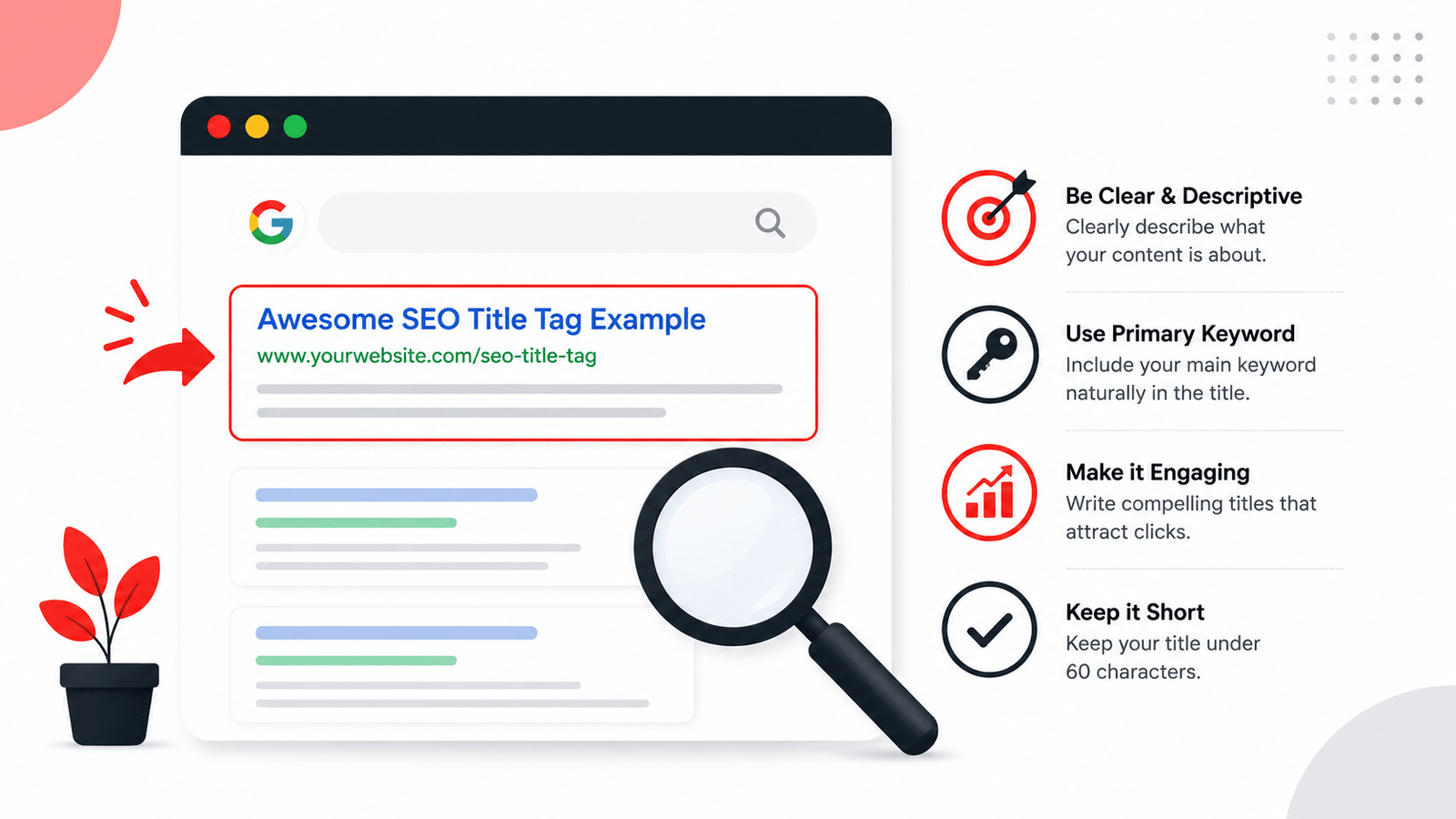
To write an SEO title tag that ranks higher: place your primary keyword near the front, keep it under 60 characters (roughly 580 pixels), make it accurately describe the page, and give searchers a reason to click over competing results. Unlike meta descriptions, title tags are a confirmed direct ranking factor — so getting them right matters more than almost any other on-page element.
What Exactly Is a Title Tag?
A title tag is the HTML element that defines the clickable headline shown in search results: <title>Your Page Title Here</title>, placed inside the <head> of your page. It also typically appears as the tab name in a browser and as the default headline when your page is shared on social media.
It’s easy to confuse the title tag with your on-page H1 heading — they’re often similar but serve different purposes. The H1 is what readers see once they’ve landed on the page; the title tag is what convinces them to land there in the first place.
Why Title Tags Are Different From Meta Descriptions
This distinction trips people up constantly, so it’s worth being precise: Google has confirmed the title tag as a genuine ranking signal, while the meta description is not. That means keyword placement, phrasing, and structure in your title tag can directly influence where you rank — not just whether people click once you’re already there.
That said, click-through rate still matters enormously for a title tag, just as it does for a description. A title that ranks in position 4 but gets ignored by searchers is worth far less than one in position 6 that consistently earns the click.
How Google Actually Uses Your Title Tag
It helps to understand what happens after you hit publish. Google crawls your page, reads the content inside your <title> tag, and generally uses it as the clickable headline in search results — but not always exactly as written. According to Google’s own documentation on title links, the system may generate an alternate title when it believes the original doesn’t accurately represent the page, is stuffed with keywords, is missing entirely, or is duplicated across many pages on the same site.
This is a useful mental model: think of your title tag as a strong suggestion to Google, not a guarantee of exactly what will appear. The more accurately and naturally it describes the page, the more likely Google is to keep it untouched. This is also why chasing a “perfect” formulaic title often backfires — a title written purely to satisfy a template, without genuinely reflecting the content, is exactly the kind of title Google is most likely to rewrite.
Ideal Title Tag Length
Like meta descriptions, Google renders title tags based on pixel width, not a strict character count — but character count remains the most practical way to stay within safe limits.
Use a meta title pixel checker to see the exact rendered width before publishing — character count alone can be misleading since “W” and “i” take up very different amounts of space.
How to Write a Title Tag That Ranks Higher
Follow this order when writing or rewriting any title tag:
Lead With Your Primary Keyword
Placing your target keyword near the start of the title gives it more weight and ensures it isn’t cut off on mobile. “SEO Title Tags: How to Write Them” beats “A Complete Guide on Writing Better SEO Title Tags” for this reason.
Make It Accurately Describe the Page
Google increasingly rewrites titles it judges misleading or irrelevant. If your title promises something the content doesn’t deliver, don’t be surprised when Google generates its own version instead.
Add a Modifier or Specificity
Words like “2026,” “Free,” “Checklist,” “Guide,” or a number (“7 Ways”) often improve CTR by signaling exactly what kind of content is behind the click.
Avoid Keyword Repetition
Using your keyword twice in a 60-character title rarely helps and often looks spammy. One clean, natural placement outperforms forced repetition.
Differentiate From Competing Results
Before finalizing a title, search your target keyword and look at what’s already ranking. If five results all say “Ultimate Guide,” find a different angle instead of blending in.
Write for the Human, Not Just the Algorithm
A title stuffed with keywords but no real promise of value gets skipped even in a top position. Read it back and ask: would I click this?
Generate Your Title Tag Free →
Title Tag Formulas by Page Type
Different pages serve different purposes, so a single formula doesn’t work everywhere. These starting templates cover the most common page types — treat them as a skeleton to adapt, not a script to fill in mechanically.
Notice that none of these formulas repeat the keyword twice or rely on filler words like “best” or “top” without backing them up elsewhere on the page. A formula only works if the finished title still reads like something a person would genuinely want to click — if it sounds robotic once filled in, rewrite it by hand instead of forcing the template.
Good vs Bad Title Tag Examples
Blog Post
“Home | Blog | Articles | Company Name | Everything About SEO Tips and Tricks”
“How to Write SEO Title Tags That Rank Higher (2026 Guide)”
Product Page
“Product123 – Buy Now – Best Price – Free Shipping – Shop Today”
“Wireless Earbuds with Noise Cancellation | Free Shipping”
Local Business
“Welcome to Our Website – Plumbing Services Company”
“Emergency Plumber in Delhi | Same-Day Repairs”
Mistakes That Quietly Hurt Title Tag Performance
Check Before You Publish
Once your title is written, preview it with a SERP preview checker to see exactly how it will render in Google’s results, and confirm your target keyword isn’t over-repeated using a keyword density checker across the full page.
Frequently Asked Questions
Is the title tag really a ranking factor?
How long should an SEO title tag be?
Should my title tag match my H1 heading exactly?
Does Google ever rewrite my title tag?
Can I use the same title tag on multiple pages?
Does adding my brand name to the title tag help SEO?
Final Thoughts
A strong title tag does two jobs at once — it tells Google exactly what your page is about, and it tells a real person why they should click it over the nine other results on the page. Lead with your keyword, stay within 60 characters, make a genuine promise of value, and check how it actually renders before you publish. That combination is what separates title tags that just exist from title tags that actually rank.