How to Generate Hreflang Tags for a Multilingual Website
Step-by-step guide to international SEO — stop showing the wrong page to the wrong audience.
To generate hreflang tag for multilingual website correctly is one of the most important steps in international SEO. If you skip this, Google may show the wrong country or language page in search results — your USA visitors might land on your India page, or Indian users may see your global version. According to Google’s official documentation, correct hreflang implementation is critical for international SEO success.
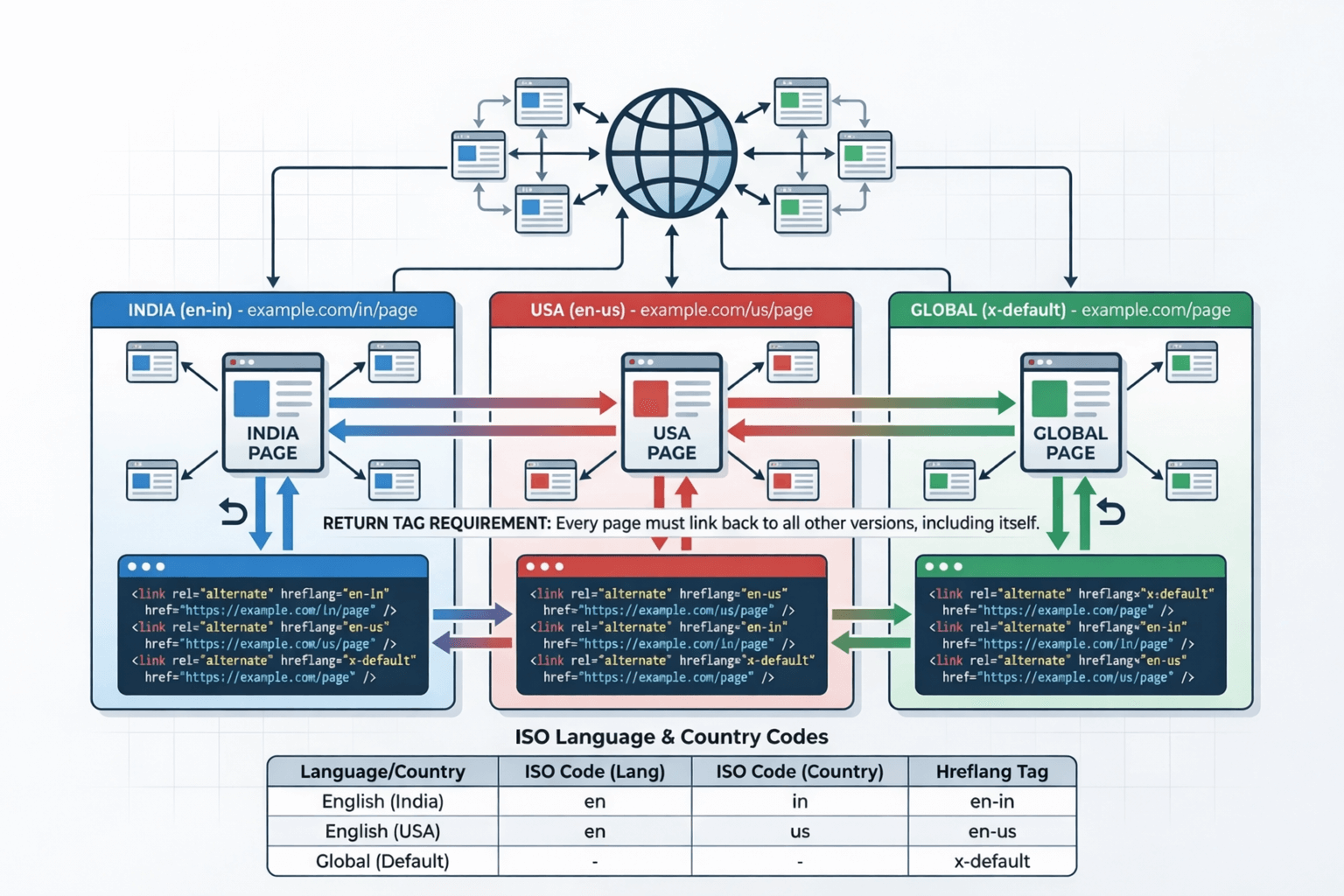
What is Hreflang Tag?
Hreflang is an HTML attribute that tells search engines which language and country version of a page should be shown to users. It helps Google understand language targeting, country targeting, alternate page versions, and regional content variations.
Basic Hreflang Syntax Example
<link rel="alternate" hreflang="en-in" href="https://example.com/in/" />
<link rel="alternate" hreflang="en-us" href="https://example.com/us/" />
<link rel="alternate" hreflang="x-default" href="https://example.com/" />
Why Hreflang is Important for SEO?
If your India and USA pages are similar, Google may treat them as duplicate content. Hreflang tells search engines they are regional alternatives — not copies.
Users see the correct regional version based on their location and language — no manual country switching needed for your visitors.
Visitors land on the page that’s most relevant to them automatically, reducing bounce rate and improving time on site.
Right geo-targeting increases click-through rate in global search results, indirectly boosting your overall SEO performance.

Step-by-Step: How to Generate Hreflang Tag for Multilingual Website
Identify Language and Country Codes
Hreflang uses ISO standards — ISO 639-1 for language (en, hi, fr) and ISO 3166-1 Alpha-2 for country (IN, US, GB). Combine them lowercase: en-in, en-us, hi-in. Always use lowercase in HTML.
Create Separate URLs for Each Version
India page: https://example.com/in/ · USA page: https://example.com/us/ · Global: https://example.com/. Each page must reference all other versions including itself.
Generate the Code
You can manually create hreflang tags, but even small mistakes can break implementation. Use our free hreflang tag generator — enter your regional URLs, select language and country, and copy & paste the code into your website instantly.
Add Return Tags on Every Page
The return tag requirement is critical: India page references US page, US page references India page, and both reference themselves. Missing return tags causes Google to ignore all your hreflang tags.
Try Free Hreflang Tag Generator →
Hreflang Tag Example for India and USA Website
<!-- India page -->
<link rel="alternate" hreflang="en-in" href="https://example.com/in/" />
<!-- USA page -->
<link rel="alternate" hreflang="en-us" href="https://example.com/us/" />
<!-- Default / Global -->
<link rel="alternate" hreflang="x-default" href="https://example.com/" />
How to Add Hreflang Tag in HTML, Sitemap & Header
HTML <head> Section
Most common method. Add the code directly inside the <head> of each page. Best for small, static, and custom coded websites.
Small / Static
XML Sitemap
Include hreflang annotations in your XML sitemap. Best for large websites, e-commerce platforms, and multilingual CMS.
E-commerce / CMS
HTTP Header
Used mainly for PDF files and non-HTML content where you cannot modify the page source directly.
PDFs / Documents

Common Hreflang Mistakes Beginners Make
en-uk instead of the correct en-gbx-default fallback tag for unmatched usersrobots.txt
Does Hreflang Improve Ranking?
Hreflang does NOT directly boost rankings. However, it improves geo-targeting, reduces duplicate content confusion, increases CTR, and improves engagement. Indirectly, this helps improve SEO performance significantly in international markets.
Frequently Asked Questions (FAQs)
What is the correct format of a hreflang tag?
hreflang="en-in" or hreflang="en-us".
<link rel="alternate" hreflang="language-country" href="URL" />